
GADGET GUIDE
Best Gadgets for Office-Goers in India
Practical office gadgets should remove everyday friction rather than add more technology to manage. This guide covers useful options for laptop connectivity, desk comfort, note-taking, device maintenance and multi-device charging.
By InstaPickr TeamUpdated
Office GadgetsProductivity TechWork EssentialsWorking Professionals
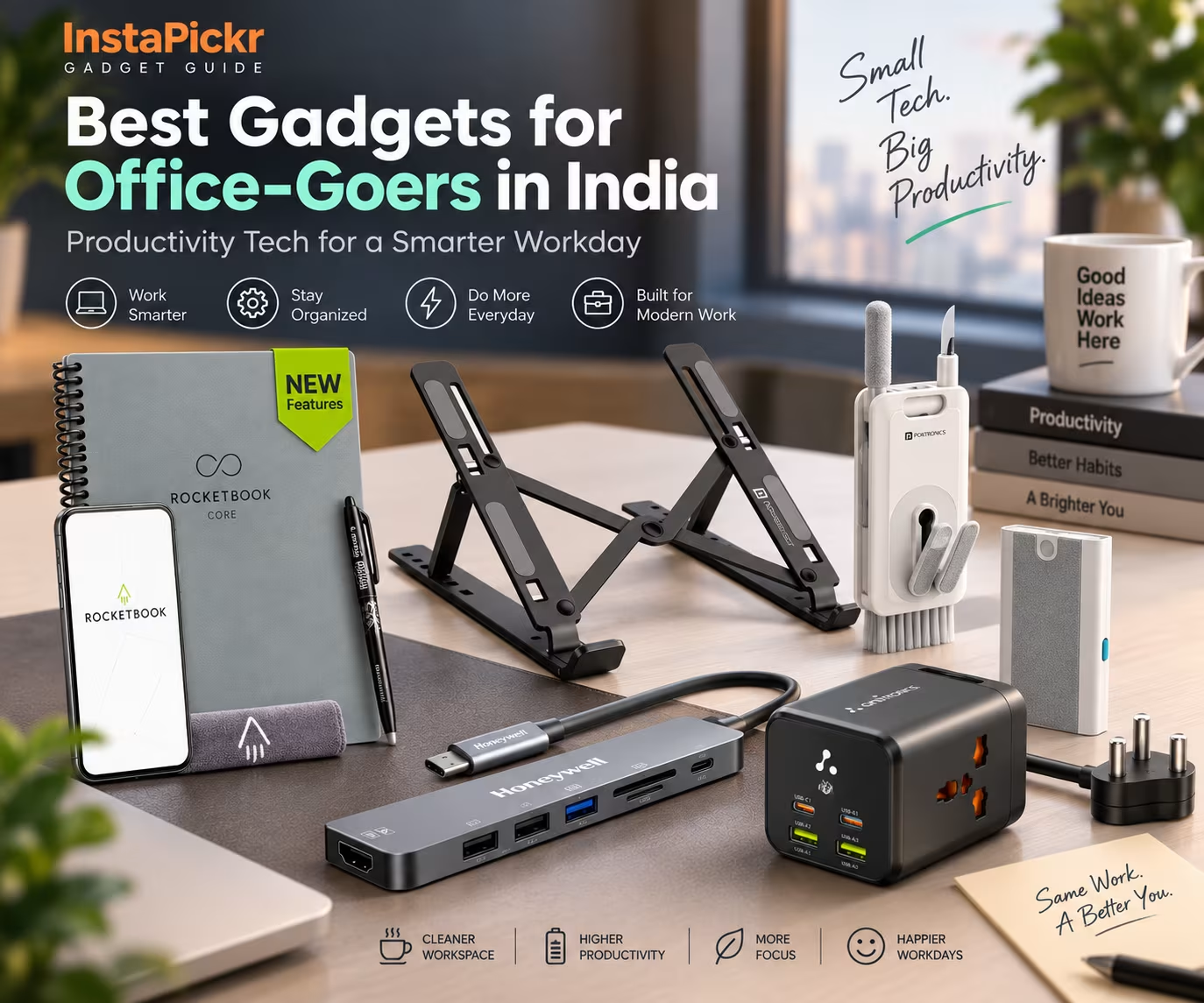
About This Gadget Guide
Useful office technology does not have to be complicated. For most working professionals, the better purchase is the gadget that removes a recurring inconvenience from the workday, whether that means dealing with limited laptop ports, improving a temporary desk setup, keeping frequently used devices clean, organising handwritten notes or powering several devices from one place.
This becomes particularly relevant for hybrid workers and people who regularly move between home and office. Portability and ease of setup can matter just as much as functionality because an accessory that is difficult to carry or inconvenient to use may quickly be left behind.
The products in this guide solve different problems rather than competing for the same role. Start by identifying the friction point that appears most often in your own routine, then consider practical factors such as compatibility, portability, available desk space and how frequently you are likely to use the gadget.
Recommended Gadgets
Explore useful gadget recommendations based on different needs and use cases.
For Everyday Device Maintenance
Portronics Clean M Multifunctional 8-in-1 Gadget Cleaning Kit
portronicsBest for
Keeping frequently used work gadgets clean
Its combination of larger cleaning tools and precision brushes and tips makes it useful for routine maintenance across laptops, keyboards, phones, earbuds and other personal gadgets, while the compact design is easier to carry between workspaces.

For Expanding Laptop Connectivity
Honeywell 7-in-1 USB-C Docking Station
honeywellBest for
USB-C laptop users who regularly connect displays, peripherals or memory cards
A single compatible USB-C connection adds HDMI, USB ports, SD and microSD readers and USB-C Power Delivery, making it useful when a laptop's built-in connectivity does not cover the rest of the desk setup.
For a More Flexible Laptop Setup
Portronics My Buddy K Adjustable Laptop Stand
portronicsBest for
Hybrid workers who want an adjustable and portable laptop position
The lightweight foldable frame, six viewing angles and support for laptops up to 17 inches make it practical for creating a raised laptop setup at home, in the office or at another workspace.
For Reusable Handwritten Notes
Rocketbook Core Next Gen Reusable Smart Notebook
rocketbookBest for
Professionals who prefer handwriting but want digital organisation
Reusable dotted pages allow notes and sketches to be written by hand, scanned through the Rocketbook app and organised digitally before the pages are wiped clean for reuse.
For Consolidating Desk Power
Ambrane Charge Hub 65 6-in-1 Charging Station
ambraneBest for
Ambrane Charge Hub 65 6-in-1 Charging Station
Workspaces with several devices that need power or charging
Detailed Recommendations
A closer look at each recommended gadget, who it is best suited for, why it is useful, and what you should consider before buying.
Best For
Routine cleaning and maintenance of everyday work gadgets
Why We Recommend It
The kit combines a duster, refillable cleaning lotion, plush cotton swab, soft-density mini brush and precision brushes and tips, allowing it to address both broader surfaces and harder-to-reach areas. The integrated mobile holder adds a separate desk-side use without requiring another accessory.
Why It's Useful
Laptops, keyboards, phones, earbuds and other frequently handled devices can require different tools for surfaces, edges and small gaps. Keeping those tools together in one compact kit makes routine cleaning easier to manage at a desk or between work locations.
Office-goers who regularly use several personal gadgets and want one portable kit for routine device upkeep rather than keeping separate cleaning accessories at different locations.
Users who already have dedicated cleaning tools for their devices or who only need a single-purpose cleaning accessory are less likely to benefit from the multi-function format.
What We Like
It covers several types of routine gadget cleaning in one compact accessory, includes tools for both larger areas and smaller gaps, and adds a mobile-holder function for desk use.
What to Consider
Its main purpose is routine gadget cleaning and maintenance. If you only need a phone stand or one specific cleaning tool, the broader 8-in-1 format may not add much value to your setup.
Best For
Expanding connectivity on compatible USB-C laptops and devices
Why We Recommend It
The dock provides a 4K HDMI output, one USB 3.0 port, two USB 2.0 ports, SD and microSD card slots and a USB-C PD 3.0 port supporting up to 100W. HDMI can mirror or extend a laptop display, while plug-and-play and hot-swap support help simplify everyday connection and disconnection.
Why It's Useful
Modern work setups can require a monitor, storage devices, memory cards and other peripherals even when the laptop itself has relatively few connection options. A docking station can consolidate these connections through one compatible USB-C port.
Professionals using a compatible USB-C laptop or Thunderbolt-supported device who regularly connect an external display, USB peripherals, storage devices or SD and microSD cards at their workspace.
Users whose laptops already provide all the ports they regularly need, or those without a compatible USB-C or Thunderbolt-supported device, are unlikely to gain the same benefit.
What We Like
It combines display output, USB connectivity, card readers and compatible USB-C Power Delivery in a single hub. The USB 3.0 port supports transfer speeds up to 5 Gbps, while the additional USB 2.0 ports expand peripheral connectivity.
What to Consider
Compatibility matters because the dock is intended for compatible USB-C laptops and Thunderbolt-supported devices. Also note that only one supplied USB port is USB 3.0; the two additional USB ports are USB 2.0 and support speeds up to 480 Mbps.
Best For
Portable laptop positioning for home, office and hybrid workspaces
Why We Recommend It
The stand provides six adjustable viewing angles in a lightweight, foldable design weighing approximately 270 g. Its aluminium-alloy frame supports laptops up to 17 inches and up to 4 kg, while silicone contact surfaces help support the laptop on the stand.
Why It's Useful
Working directly from a laptop on different desks can leave users with limited control over screen height and viewing angle. An adjustable stand provides more flexibility in how the notebook is positioned while keeping the setup easy to move.
Hybrid workers, office-goers and laptop users who frequently change work locations and want a stand that can be folded and carried rather than kept permanently on one desk.
People who mainly use a fixed desktop setup or those specifically looking for a powered laptop-cooling solution may not need this type of portable passive stand.
What We Like
Six viewing angles provide useful positioning flexibility, while the foldable 270 g design suits users who carry accessories between locations. Its open structure also promotes natural airflow around the laptop.
What to Consider
The stand uses passive ventilation and has no powered cooling fan. Users should also check that their laptop falls within the stated support limits of up to 17 inches and up to 4 kg.
Best For
Combining handwritten work notes with digital organisation
Why We Recommend It
Its dotted reusable pages support writing, sketching, planning and visual work with the included Pilot Frixion Pen. Notes can be scanned through the Rocketbook app and saved to supported services including Google Drive, Dropbox and OneNote, while Smart Titles and Smart Tags help organise digitised files.
Why It's Useful
Some professionals think and plan more naturally on paper but still need notes to be stored digitally. A reusable notebook can preserve the handwriting experience while providing a process for moving completed pages into cloud-based organisation.
Professionals who regularly take handwritten meeting notes, plan projects, sketch layouts, work through equations or diagrams, and want those pages to become part of a digital filing workflow.
Users who already work entirely through typed digital notes, or those who do not want to scan pages through an app before erasing and reusing them, may prefer a different note-taking workflow.
What We Like
The reusable pages reduce the need to continually replace notebooks, while the app workflow connects handwriting with supported cloud services. The side spiral binding allows the notebook to lay flat, which is useful for sketches, diagrams and other visual layouts.
What to Consider
The reusable workflow depends on writing with the included Pilot Frixion Pen, scanning notes that need to be retained and wiping pages with a damp cloth before reuse. Users should also choose between the supplied Letter and Executive size options based on how much writing space and portability they prefer.
Best For
Powering and charging several devices from one compact station
Why We Recommend It
The charging station combines two USB-A ports, two Type-C ports and two AC sockets for simultaneous use. The supplied information states support for 2500W BoostedSpeed power delivery, while GaN technology enables a compact and efficient design with reduced heat compared with traditional chargers.
Why It's Useful
A work desk can quickly accumulate phones, laptops and other electronics that all need access to power. Combining USB connections and AC sockets in one unit can reduce the need to spread those devices across several separate charging points.
Professionals whose regular desk setup includes several devices that need charging or power and who want USB and AC connections available from one compact unit.
Users who normally charge or power only one or two devices at a time may not need a six-connection charging station.
What We Like
The mix of USB-A, Type-C and AC connections makes the station useful for varied desk electronics. Its compact form factor suits tight spaces and carrying, while SafeCharge Technology provides overcurrent, overheating, overvoltage and surge protection. A 365-day warranty covers manufacturing defects.
What to Consider
Its main advantage is consolidating multiple power connections, so users with very simple charging requirements may not make full use of the six available connections.
How We Choose
This guide focuses on how clearly each gadget addresses a recurring office-related problem rather than comparing products from different categories against one another. The products serve different purposes, so usefulness depends on the type of work friction a reader wants to solve.
- Everyday usefulness: We prioritise functions that can support recurring work tasks, device maintenance or desk setup rather than novelty features.
- Problem-solution fit: Each recommendation has a defined role, such as improving laptop connectivity, positioning a notebook computer, organising handwritten notes or consolidating device power.
- Portability: For office-goers and hybrid workers, we consider whether the supplied design information makes a gadget practical to carry or move between workspaces.
- Compatibility and limits: Where compatibility requirements, supported device sizes, port standards or other operating boundaries are supplied, they are treated as important purchase considerations.
- Ease of everyday use: Features such as foldable designs, plug-and-play operation, reusable workflows and multi-function formats are considered according to how they simplify a recurring task.
The recommendations are based on the supplied product information and their practical relevance to office users. No hands-on testing claim is being made.
Final Verdict
There is no single office gadget here that makes sense for every professional because each one addresses a different part of the workday. The useful choice is the one that removes a problem you encounter regularly, whether that involves laptop setup, connectivity, handwritten organisation, device upkeep or managing power at your desk.
Office-goers who move between locations should place extra weight on portability and setup effort, while people building a more permanent workspace may care more about connections, device support and how well an accessory fits into their existing equipment. Choose according to the recurring task you want to make easier rather than the number of features a gadget offers.
Related Articles
Explore more guides and useful content related to this topic.